
GetResponse Honest Review (2026): Is It Worth It for Email Marketing and Affiliate Marketing?
Looking for an honest GetResponse review? GetResponse is an email marketing and automation platform designed to help businesses grow an email list, build landing pages, automate follow ups, and turn subscribers into customers. It also offers tools for sales funnels, webinars, online courses, and content monetization, depending on the plan.
In this review, we will look at GetResponse features, pricing, pros and cons, and how it compares with alternatives such as Mailchimp and Brevo. We will also explore whether GetResponse is a good choice for bloggers, affiliate marketers, creators, and people building an online business.
Quick verdict: GetResponse is worth considering if you want email marketing, automation, landing pages, and audience building tools in one platform. Its biggest advantage is the combination of these features, while the best plan for you depends on your budget, audience size, and automation needs.
Ready to explore GetResponse?
Try GetResponse Here →
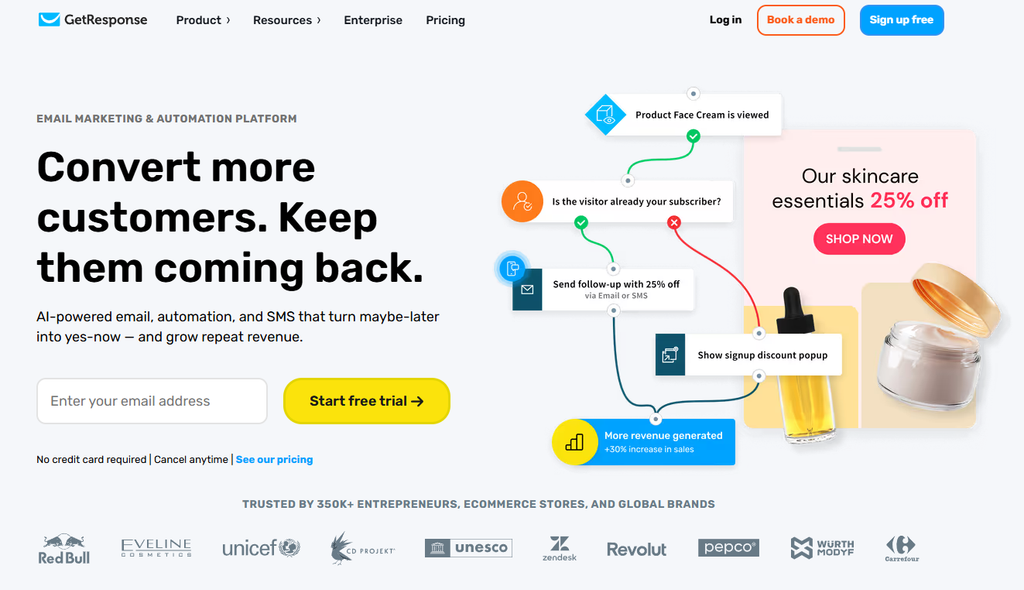
What Is GetResponse?
GetResponse is an all in one email marketing and marketing automation platform. It helps businesses communicate with subscribers, create lead generation campaigns, nurture potential customers, and promote products or services.
Instead of using separate tools for every part of your marketing strategy, you can manage several important activities from one account.
Depending on your subscription, GetResponse can help you:
- Build an email list with signup forms and popups.
- Create professional email newsletters.
- Send automated welcome emails and follow up sequences.
- Build landing pages for lead magnets, offers, and campaigns.
- Segment subscribers based on their interests and behavior.
- Create sales funnels and promotional campaigns.
- Use AI powered tools to help generate marketing content.
- Host webinars and sell online courses with eligible plans.
For bloggers and affiliate marketers, the main attraction is the ability to turn website visitors into email subscribers and continue communicating with those subscribers over time.
That matters because website traffic alone does not guarantee sales. An email list gives you another way to reach people who have already shown interest in your content.
Why Consider GetResponse for an Online Business?
One of the biggest challenges when starting an online business is deciding which tools to use. You may need a website, landing pages, an email service, a lead magnet, and an automated follow up sequence.
Managing everything separately can become complicated.
GetResponse brings several of these functions together, which can make your marketing setup easier to manage.
1. Email Marketing That Supports Business Growth
Email marketing remains a useful way to share content, build relationships, announce new products, and promote relevant offers.
With GetResponse, you can create newsletters, manage contacts, and send campaigns without building every email from scratch.
For example, a blogger could send a weekly newsletter with helpful tips and links to recent articles. An affiliate marketer could send educational emails that introduce a problem, explain potential solutions, and recommend a relevant product when appropriate.
The important part is to provide value instead of sending promotional messages all the time.
2. Marketing Automation That Saves Time
Automation is one of the most useful reasons to consider GetResponse.
Imagine someone downloads your free guide from your website. You could create an automated sequence that welcomes the subscriber, delivers the guide, shares useful advice, and introduces a relevant offer in a later email.
Once configured, the sequence can run automatically for new subscribers, subject to your settings and plan.
This gives you a way to build a more consistent follow up process without manually sending every message.
GetResponse’s Starter plan includes one automation workflow, while the Marketer plan includes unlimited automation workflows according to its published plan details.
3. Landing Pages and Lead Generation Tools
A landing page gives visitors one clear action to take, such as subscribing to your newsletter or downloading a free resource.
GetResponse includes landing page tools, signup forms, and popups. These can be useful if you want to collect email addresses from blog readers or visitors arriving from social media.
For example, if your blog covers affiliate marketing, you could offer a free beginner’s checklist in exchange for an email subscription.
You can then send educational emails and introduce affiliate products that genuinely fit your audience’s needs.
4. AI Tools for Creating Marketing Content
GetResponse also offers AI powered tools designed to help with tasks such as generating email content and creating campaign materials.
These tools may help you get started faster, especially when you are planning a campaign or need ideas for email copy.
However, AI generated content should still be reviewed and personalized. Your audience needs useful information, accurate claims, and a reason to trust your recommendations.
GetResponse Pricing: How Much Does It Cost?
GetResponse offers different plans depending on the features you need. The following prices are the published starting prices shown on its official pricing page at the time of writing.
| Plan | Monthly billing | Annual billing equivalent | Best for |
|---|---|---|---|
| Starter | $19/month | $15.58/month | Beginners and basic email marketing |
| Marketer | $59/month | $48.38/month | Advanced automation and marketing campaigns |
| Creator | $69/month | $56.58/month | Creators, courses, and paid newsletters |
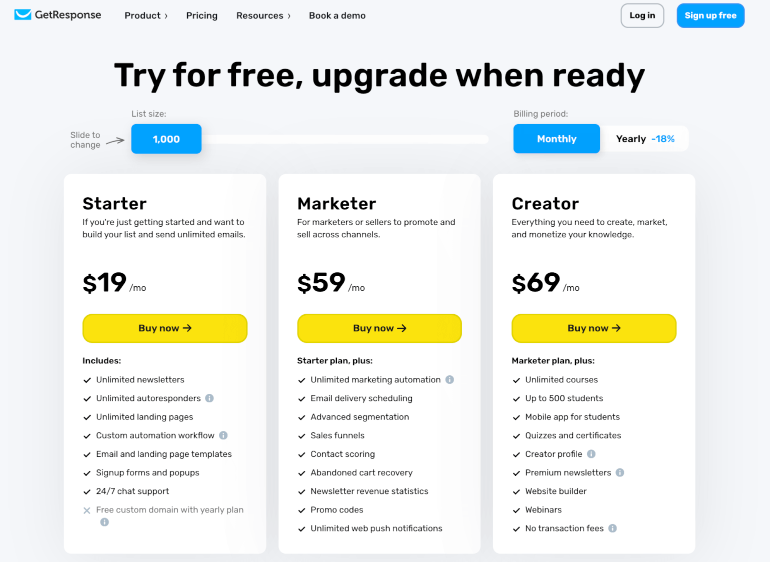
Pricing note: These are published starting prices, not guaranteed quotes for every account. Actual pricing can depend on billing frequency, contact list size, promotions, and plan availability. Verify the current price before purchasing.
GetResponse Starter
Starter is designed for people who want to begin building an email list and sending campaigns.
It includes features such as:
- Email newsletters and unlimited monthly email sends.
- Landing pages and signup forms.
- AI powered content tools.
- A welcome email series.
- One custom automation workflow.
Who should consider it?
New bloggers, solo entrepreneurs, and affiliate marketers who need a practical starting point for building an audience and sending follow up emails.
Explore GetResponse Starter →
GetResponse Marketer
Marketer is intended for businesses that need more advanced marketing capabilities.
In addition to Starter features, it includes options such as:
- Unlimited automation workflows.
- Advanced audience segmentation.
- Sales funnels.
- Abandoned cart recovery.
- Promotional tools and revenue reporting.
Who should consider it?
Businesses that need more sophisticated customer journeys, online stores that want to recover abandoned carts, and marketers running multiple campaigns.
GetResponse Creator
Creator is designed for people who want to create and monetize digital content.
Depending on the current plan terms, its features include tools for:
- Creating and selling online courses.
- Running webinars.
- Offering paid newsletters.
- Building a website.
- Monetizing knowledge and digital content.
Who should consider it?
Coaches, educators, creators, and entrepreneurs who want email marketing alongside tools for delivering and selling digital content.
My recommendation: Do not automatically choose the most expensive plan. Start by identifying which features you will actually use. If you only need newsletters and a simple welcome sequence, a lower tier may be sufficient. If you need advanced automation or course monetization, compare the higher tiers carefully.
Check Current GetResponse Plans and Pricing →
GetResponse Pros and Cons
No email marketing platform is perfect for every business. Here is a balanced look at the main advantages and potential drawbacks.
GetResponse Pros
Several marketing tools in one platform
Email marketing, landing pages, automation, and other marketing features can be managed from one account. This can reduce the need to coordinate multiple services.
Useful automation capabilities
Automated email sequences can help businesses welcome subscribers, nurture leads, and follow up consistently.
Options for different business models
The platform serves bloggers, ecommerce businesses, affiliate marketers, creators, and companies with more advanced marketing needs.
AI powered content assistance
AI features can help with drafting emails and planning campaigns, although human editing remains important.
Free entry point
GetResponse offers a free account option, allowing eligible users to explore basic features before committing to a paid plan. Free plan limits apply.
GetResponse Cons
Costs can increase as your needs grow
Your subscription choice and contact list size can affect the total price. Check the cost at your expected list size before making a long term commitment.
Not every feature is included in every plan
Advanced automation, ecommerce tools, and content monetization features may require an upgrade.
An all in one platform may be more than some users need
If you only want to send occasional newsletters, a simpler or less expensive service may be sufficient.
There is still a learning curve
Setting up segmentation, automated workflows, and complete campaigns takes time. The more advanced your strategy becomes, the more planning it requires.
Overall, the strongest reason to choose GetResponse is not that it is perfect. It is that its combination of email marketing and additional marketing tools may fit businesses that want to manage more of their customer journey in one place.
GetResponse vs Mailchimp vs Brevo
Choosing an email marketing service is easier when you compare the tools against your actual needs rather than assuming one platform is best for everyone.
| Feature | GetResponse | Mailchimp | Brevo |
|---|---|---|---|
| Email newsletters | Yes | Yes | Yes |
| Marketing automation | Yes, plan dependent | Yes, plan dependent | Yes, plan dependent |
| Landing pages | Yes | Availability depends on plan | Available on eligible plans |
| Webinars and courses | Available on eligible plans | Not its main focus | Not its main focus |
| SMS and other channels | Availability depends on plan | Availability depends on plan and region | Strong multichannel offering |
| Best fit | Email marketing plus broader marketing and creator tools | Businesses focused on email campaigns and audience management | Businesses interested in email and multichannel communication |
GetResponse vs Mailchimp
Mailchimp is a well known email marketing platform with campaign management, audience tools, and automation features.
GetResponse may be a better fit if you specifically want to combine email marketing with features such as sales funnels, webinars, and online course monetization.
Mailchimp may be more suitable if its campaign tools and existing integrations match your workflow.
Compare the total cost at your intended contact count, because advertised starting prices do not always reflect what a growing business will pay.
GetResponse vs Brevo
Brevo offers email marketing alongside other communication channels, including SMS and WhatsApp, with features varying by plan.
GetResponse may appeal more to users who prioritize landing pages, sales funnels, and creator focused tools. Brevo may be attractive to businesses that want to manage several communication channels or prefer pricing based on email sending volume.
The right choice depends on how often you send emails, how large your audience is, which channels you use, and which automation features you need.
Which Platform Is Better for Affiliate Marketing?
For affiliate marketing, the important questions are whether the platform supports your email strategy, lets you build appropriate signup pages, and provides the automation and segmentation you need.
GetResponse is a strong option to investigate if you want to combine those functions in one place.
However, no email service guarantees affiliate commissions. Results depend on the quality of your audience, your offers, the relevance of your emails, your traffic sources, and your ability to follow applicable email marketing rules.
Is GetResponse Good for Affiliate Marketing?
GetResponse can be useful for affiliate marketers who want to build an email list rather than rely entirely on search engines or social media.
Here is a simple example of how you could use it:
Step 1: Attract visitors. Publish useful blog articles targeting relevant search terms.
Step 2: Offer a lead magnet. Create a checklist, guide, or resource that solves a specific problem for your audience.
Step 3: Collect email subscribers. Use a signup form or landing page to invite visitors to join your list.
Step 4: Deliver useful information. Send a welcome email and a sequence of educational messages.
Step 5: Recommend relevant products. When appropriate, explain how a product could help and include your affiliate link with a clear disclosure.
Step 6: Improve your campaigns. Use available reporting and testing features to understand what your audience responds to.
For example, a blog about starting an online business might offer a free guide to email list building. The follow up emails could explain how to choose an email platform, create a welcome sequence, and evaluate marketing tools.
GetResponse can help manage this process, but the strategy and content still matter. Avoid buying email lists, misleading subscribers, or sending affiliate promotions without following the platform’s policies and applicable laws.
Want to build your email marketing system?
How to Get Started With GetResponse
If you are new to email marketing, you do not need to build a complicated system on day one.
A simple starting process is:
- Create a GetResponse account and review the available plan options.
- Decide who your target audience is and what problem you want to solve.
- Create a useful lead magnet or newsletter signup offer.
- Build a landing page or signup form.
- Write a welcome email that explains what subscribers can expect.
- Create a short follow up sequence with genuinely helpful information.
- Monitor your results and improve your emails over time.
Start with a simple system that you can maintain. Add more advanced automation only when you have a clear reason to use it.
Get Started With GetResponse →
Frequently Asked Questions About GetResponse
Is GetResponse worth it in 2026?
GetResponse is worth considering if you need email marketing, landing pages, and automation in one platform. It may be especially useful if you expect to expand into sales funnels, ecommerce marketing, webinars, or online courses. Whether it is worth the price depends on the features you need and the size of your audience.
How much does GetResponse cost per month?
The published starting prices are $19 per month for Starter, $59 for Marketer, and $69 for Creator when billed monthly. The listed annual billing equivalents are $15.58, $48.38, and $56.58 per month, respectively. Prices and plan terms can change, so check the official pricing page before purchasing.
Does GetResponse have a free plan?
Yes. GetResponse offers a free account with limitations on features and usage. It also advertises a 14 day trial of premium features. Check the current official offer to confirm which features are available to your account.
Is GetResponse better than Mailchimp?
Neither platform is universally better. GetResponse may be more suitable if you want email marketing alongside sales funnels, webinars, or course monetization tools. Mailchimp may suit businesses whose needs align more closely with its campaign management and audience features. Compare current prices and the features available on each plan.
Is GetResponse good for beginners?
It can be. Beginners can start with basic email marketing and gradually introduce more advanced tools as their needs grow. Some features require learning and setup, so starting with a simple newsletter and welcome sequence can make the process easier.
Can I use GetResponse for affiliate marketing?
GetResponse can support an affiliate marketing strategy through email campaigns, landing pages, and automation. You must still follow GetResponse’s current terms, applicable anti spam and privacy laws, and relevant affiliate disclosure requirements. Do not assume that every type of affiliate email or promotional practice is permitted.
Does GetResponse guarantee email marketing results?
No. Using an email marketing platform does not guarantee sales, commissions, subscriber growth, or inbox placement. Results depend on many factors, including your audience, content, offer, sending practices, and overall marketing strategy.
Final Verdict: Should You Choose GetResponse?
GetResponse is a platform worth considering if your goal is to build an audience, nurture subscribers, and develop a more organized online marketing system.
Its combination of email campaigns, automation, landing pages, and additional tools makes it particularly interesting for bloggers, online entrepreneurs, affiliate marketers, and creators who want room to expand.
The main consideration is cost. Review the plan limits, calculate the price for your expected audience size, and make sure you are paying for features you will actually use.
If you want a platform that can support more than basic newsletters, GetResponse deserves a place on your shortlist.

Affiliate Disclosure: This article contains affiliate links. If you purchase through one of these links, we may earn a commission at no additional cost to you. This helps support the website. Our goal is to provide useful information so readers can make informed decisions.
Editorial note: Before publishing, personalize this review with your actual experience if you have used GetResponse. Verify the latest pricing, plan limits, and features. Do not describe results or firsthand experiences that you have not personally confirmed.